Tessif
Following sections give detailed instructions on how to create fully usable
energy systems using Tessif's Energy System.
Purpose
The purpose for tessif having it’s own energy system simulation model is twofold:
It serves as abstract energy system model interface designed to be used by engineers. Meaning it supports spreadsheet data manipulation as well as a quite verbose interface when it comes to parameterization and result accessing. Combined with tessif’s ability to transform energy system data between different models the
Tessif's Energy Systemprovides a uniform and low threshold interface for performing energy supply system analysis.It serves as reference point when comparing different models. Tessif is simple and straightforward and often times overgeneralizes and oversimplifies modeling approach. Therfor it can be understood as a ‘minimum effort’ approach suited as a baseline for comparisons.
Concept
From tessif’s point of view an energy system is considered as an arbitrary aglomeration of energy system components. These components might be (from an engineering point of view) reasonably connected and parmeterized and their interaction might even be optmizable using various kinds of tools. But this is by no means a necessity for tessif’s energy systems and especially true for its inherent energy system model.
This offers great power and flexibility:
Tessif’s model can be used soley as data interface for automating model data transformation without having to comply to eventual solver needs
A set of parameters does not have to be compatible with all of the models supported by tessif, allowing even contradictive models to be parameterized the same way, deligating the task of proper model creation to one of tessif’s transformation utilities.
But with great power also comes great responsibility:
Components can be parameterized in ways none of the supported models would be able to compile or optimize
There is no machine supported data supply as there is for example in a compiler feedback
Transformation between highly specified and potentially contradictive models can not be covered by tessif’s generalization approach.
Energy System Components
Tessif’s energy systems can be composed of 6 basic or abstract components:
Note
When providing data for each of these components, various spelling variations are recognized.
Data Input
Tessif strives to be data agnostic and therefore provides a wide variaty of supported data formats for in and output. Probably most notable from an engineering point of view are spreadsheet like data formats.
For programers and seasoned energy system simulation users mapping like data formats such as cfg, json, sdp, xml and yaml are probably quite useful as they enable the use of a lot of different software available but yet are not very common to providing data for energy system simulation tools.
For additional info also refer to the Concept section inside Data Input.
Examples
Following sections provide verbose examples on how to manully code energy system model instances to perform simulation tasks
Minimum Working Example
Note
The exaxt same energy system can be accessed using
tessif.examples.data.tsf.py_hard.create_mwe().
Import the needed packages:
import numpy as np
import pandas as pd

from tessif.model import components
from tessif.model import energy_system
Create a simulation time frame of 2 one hour timesteps as a
pandas.DatetimeIndex:timeframe = pd.date_range('7/13/1990', periods=2, freq='H')
Creating the individual energy system components:
3.1 Creating a
sourceserving as fuel delivering entity:fuel_supply = components.Source( name='Gas Station', outputs=('fuel',), # Minimum number of arguments required )
3.2 Creating a
transformerconverting fuel into electricity:power_generator = components.Transformer( name='Generator', inputs=('fuel',), outputs=('electricity',), conversions={('fuel', 'electricity'): 0.42}, # Minimum number of arguments required )
3.3 Creating a
sinkrepresenting the electricity demand:demand = components.Sink( name='Demand', inputs=('electricity',), # Minimum number of arguments required )
3.4 Creating a
storagebalancing out load deficits:storage = components.Storage( name='Battery', input='electricity', output='electricity', capacity=100, initial_soc=10, # Minimum number of arguments required )
3.5 and 3.6 Tying the energy system together using
bussesbetween fuel supply and power_generator:fuel_supply_line = components.Bus( name='Pipeline', inputs=('Gas Station.fuel',), outputs=('Generator.fuel',), # Minimum number of arguments required )
and between power_generator, storage and demand:
electricity_line = components.Bus(
    name='Powerline',
    inputs=('Generator.electricity', 'Battery.electricity'),
    outputs=('Demand.electricity', 'Battery.electricity'),
    # Minimum number of arguments required
 )
Creating the actual energy system:
es = energy_system.AbstractEnergySystem(
    uid='my_energy_system',
    busses=(fuel_supply_line, electricity_line),
    sinks=(demand,),
    sources=(fuel_supply,),
    transformers=(power_generator,),
    storages=(storage,),
    timeframe=timeframe,
)
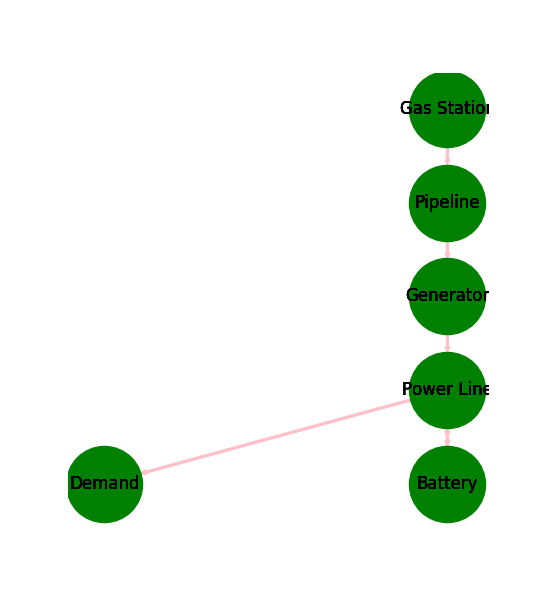
Transforming the energy system into a networkx graph to visulize it:
import matplotlib.pyplot as plt
import tessif.visualize.nxgrph as nxv
grph = es.to_nxgrph()
drawing_data = nxv.draw_graph(
    grph, node_color='green', edge_color='pink')
plt.draw()
Storing the energy system:
dump_msg = es.dump()
Using this newly generated energy system in a different python context by importing it.
Note
The code of steps 1 to 5 is wrapped in a create_mwe function for
convenience meaning it is copy pastable
>>> from tessif.examples.data.tsf.py_hard import create_mwe
>>> esys = create_mwe()
>>> for node in esys.nodes:
...     print(node.uid.name)
Pipeline
Powerline
Gas Station
Demand
Generator
Battery
Fully Parameterized Working Example
Note
The exaxt same energy system can be accessed using
tessif.examples.data.tsf.py_hard.create_fpwe().
Import the needed packages:
from tessif.model import components
from tessif.model import energy_system
import numpy as np
import pandas as pd
import tessif.frused.namedtuples as nts
Create a simulation time frame of of 2 one hour timesteps as a
pandas.DatetimeIndex:timeframe = pd.date_range('7/13/1990', periods=2, freq='H')
Creating the individual energy system components:
3.1 Creating a
sourceserving as fuel delivering entity:fuel_supply = components.Source( name='Gas Station', outputs=('fuel',), # Minimum number of arguments required latitude=42, longitude=42, region='Here', sector='Power', carrier='Fuel', node_type='hub', accumulated_amounts=nts.MinMax(min=0, max=float('+inf')), flow_rates={'fuel': nts.MinMax(min=0, max=22)}, flow_costs={'fuel': 0}, flow_emissions={'fuel': 0}, flow_gradients={ 'fuel': nts.PositiveNegative(positive=42, negative=42)}, gradient_costs={ 'fuel': nts.PositiveNegative(positive=1, negative=1)}, timeseries={'fuel': {'MinMax': nts.MinMax(min=0, max=np.array([10, 22]))}}, expandable={'fuel': False}, expansion_costs={'fuel': 0}, expansion_limits={'fuel': nts.MinMax(min=0, max=float('+inf'))}, initial_status=True, status_inertia=nts.OnOff(on=1, off=1), status_changing_costs=nts.OnOff(on=0, off=0), number_of_status_changes=nts.OnOff(on=float('+inf'), off=10), costs_for_being_active=0, # Total number of arguments to specify source object )
3.2 Creating a
transformerconverting fuel into electricity:power_generator = components.Transformer( name='Generator', inputs=('fuel',), outputs=('electricity',), conversions={('fuel', 'electricity'): 0.42}, # Minimum number of arguments required latitude=42, longitude=42, region='Here', sector='Power', carrier='Force', node_type='hub', flow_rates={ 'fuel': nts.MinMax(min=0, max=50), 'electricity': nts.MinMax(min=5, max=15)}, flow_costs={'fuel': 0, 'electricity': 0}, flow_emissions={'fuel': 0, 'electricity': 0}, flow_gradients={ 'fuel': nts.PositiveNegative(positive=50, negative=50), 'electricity': nts.PositiveNegative(positive=10, negative=10)}, gradient_costs={ 'fuel': nts.PositiveNegative(positive=0, negative=0), 'electricity': nts.PositiveNegative(positive=0, negative=0)}, timeseries={'electricity': {'maximum_apt': np.array([16, 7])}}, expandable={'fuel': False, 'electricity': False}, expansion_costs={'fuel': 0, 'electricity': 0}, expansion_limits={ 'fuel': nts.MinMax(min=0, max=float('+inf')), 'electricity': nts.MinMax(min=0, max=float('+inf'))}, initial_status=True, status_inertia=nts.OnOff(on=0, off=2), status_changing_costs=nts.OnOff(on=0, off=0), number_of_status_changes=nts.OnOff(on=float('+inf'), off=9), costs_for_being_active=0, # Total number of arguments to specify source object )
3.3 Creating a
sinkrepresenting the electricity demand:demand = components.Sink( name='Demand', inputs=('electricity',), # Minimum number of arguments required latitude=42, longitude=42, region='Here', sector='Power', carrier='Force', node_type='hub', accumulated_amounts=nts.MinMax(min=0, max=float('+inf')), flow_rates={'electricity': nts.MinMax(min=8, max=11)}, flow_costs={'electricity': 0}, flow_emissions={'electricity': 0}, flow_gradients={ 'electricity': nts.PositiveNegative(positive=11, negative=11)}, gradient_costs={'electricity': nts.PositiveNegative( positive=0, negative=0)}, timeseries=None, expandable={'electricity': False}, expansion_costs={'electricity': 0}, expansion_limits={ 'electricity': nts.MinMax(min=0, max=float('+inf'))}, initial_status=True, status_inertia=nts.OnOff(on=2, off=1), status_changing_costs=nts.OnOff(on=0, off=0), number_of_status_changes=nts.OnOff(on=float('+inf'), off=8), costs_for_being_active=0, # Total number of arguments to specify sink object )
3.4 Creating a
storagebalancing out load deficits:storage = components.Storage( name='Battery', input='electricity', output='electricity', capacity=100, initial_soc=10, # Minimum number of arguments required latitude=42, longitude=42, region='Here', sector='Power', carrier='Force', node_type='hub', idle_changes=nts.PositiveNegative(positive=0, negative=1), flow_rates={'electricity': nts.MinMax(min=0, max=10)}, flow_efficiencies={ 'electricity': nts.InOut(inflow=0.95, outflow=0.93)}, flow_costs={'electricity': 0}, flow_emissions={'electricity': 0}, flow_gradients={ 'electricity': nts.PositiveNegative(positive=10, negative=10)}, gradient_costs={'electricity': nts.PositiveNegative( positive=0, negative=0)}, timeseries=None, expandable={'electricity': False}, expansion_costs={'electricity': 0}, expansion_limits={ 'electricity': nts.MinMax(min=0, max=float('+inf'))}, initial_status=True, status_inertia=nts.OnOff(on=0, off=2), status_changing_costs=nts.OnOff(on=0, off=0), number_of_status_changes=nts.OnOff(on=float('+inf'), off=42), costs_for_being_active=0, # Total number of arguments to specify source object )
3.5 and 3.6 Tying the energy system together using
bussesbetween fuel supply and power_generator:fuel_supply_line = components.Bus( name='Pipeline', inputs=('Gas Station.fuel',), outputs=('Generator.fuel',), # Minimum number of arguments required latitude=42, longitude=42, region='Here', sector='Power', carrier='fuel', node_type='fuel_line', # Total number of arguments to specify bus object )
and between power_generator, storage and demand:
electricity_line = components.Bus(
    name='Powerline',
    inputs=('Generator.electricity', 'Battery.electricity'),
    outputs=('Demand.electricity', 'Battery.electricity'),
    # Minimum number of arguments required
    latitude=42,
    longitude=42,
    region='Here',
    sector='Power',
    carrier='Force',
    node_type='hub',
    # Total number of arguments to specify bus object
 )
Creating the actual energy system:
es = energy_system.AbstractEnergySystem(
    uid='my_energy_system',
    busses=(fuel_supply_line, electricity_line),
    sinks=(demand,),
    sources=(fuel_supply,),
    transformers=(power_generator,),
    storages=(storage,),
    timeframe=timeframe,
)
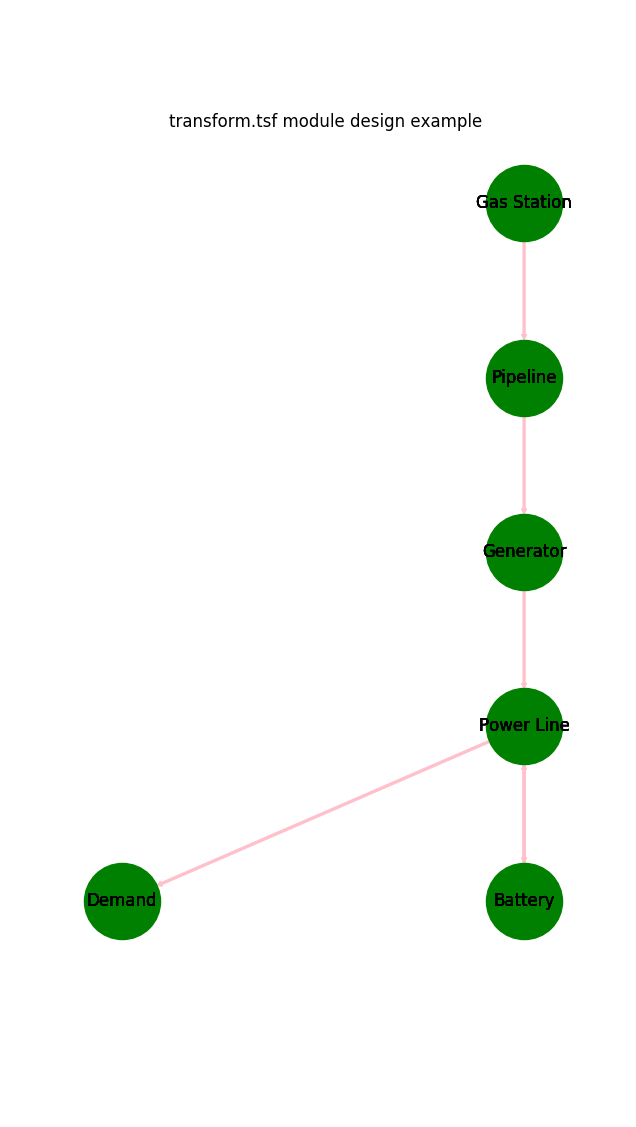
Transforming the energy system into a networkx graph to visulize it:
import matplotlib.pyplot as plt
import tessif.visualize.nxgrph as nxv
grph = es.to_nxgrph()
drawing_data = nxv.draw_graph(
    grph, node_color='green', edge_color='pink')
plt.draw()
Storing the energy system:
dump_msg = es.dump()
Using this newly generated energy system in a different python context by importing it.
Note
The code of steps 1 to 5 is wrapped in a create_fpwe function for
convenience meaning it is copy pastable
>>> from tessif.examples.data.tsf.py_hard import create_fpwe
>>> esys = create_fpwe()
>>> for node in esys.nodes:
...     print(node.uid.name)
Pipeline
Powerline
Gas Station
Solar Panel
Demand
Generator
Battery