energy_system
Main Class
Aggregate tessif's abstract components into an energy system. |
Alternative Ways of Creation
Create an energy system using a nested mapping from an external data source. |
|
Create an energy system from a collection of component instances. |
Key Functionalities
Connect another |
|
Store (dump) the energy system into |
|
Restore a dumped energy system |
|
Duplicate the energy system and return it. |
|
Store (dump) the energy system info as a hdf5 file. |
|
Store (dump) the energy system info as a hdf5 file. |
|
Transform the |
|
Create an energy system instance from a pickle dumped binary. |
|
Create an energy system using a nested mapping from an external data source. |
|
Create an energy system from a collection of component instances. |
energy_system is a tessif module
transforming the abstract data representation of an energy system stored as
mapping into
an actual object. This object in turn can than very conveniently be transformed
into other energy system models or beeing simulated using tessif’s simulation
engine.
Note
Mapping like representations are usually returned by utilities part of the
parse module.
Example
Using the hardcoded example (thoroughly explained
here):
>>> import tessif.examples.data.tsf.py_hard as tsf_examples
>>> es = tsf_examples.create_fpwe()
>>> for node in es.nodes:
...    print(node.uid.name)
Pipeline
Powerline
Gas Station
Solar Panel
Demand
Generator
Battery
- class tessif.model.energy_system.AbstractEnergySystem(uid, *args, **kwargs)[source]
Bases:
objectAggregate tessif’s abstract components into an energy system.
- Parameters:
uid¶ (Hashable) – Hashable unique identifier. Usually a string aka a name.
busses¶ (Iterable) – Iterable of
Busobjects to be added to the energy systemsinks¶ (Iterable) – Iterable of
Sinkobjects to be added to the energy systemsources¶ (Iterable) – Iterable of
Sourceobjects to be added to the energy systemtransformers¶ (Iterable) – Iterable of
Transformerobjects to be added to the energy systemstorages¶ (Iterable) – Iterable of
Storageobjects to be added to the energy systemtimeframe¶ (pandas.DatetimeIndex) –
Datetime index representing the evaluated timeframe. Explicitly stating:
initial datatime (0th element of the
pandas.DatetimeIndex)number of timesteps (length of
pandas.DatetimeIndex)temporal resolution (
pandas.DatetimeIndex.freq)
For example:
idx = pd.DatetimeIndex(
    data=pd.date_range(
        '2016-01-01 00:00:00', periods=11, freq='H'))
global_constraints¶ (dict, default={'emissions': float('+inf')}) –
Dictionary of
numericvalues mapped to global constraint namingstrings.Recognized constraint keys are:
emissions…
For a more detailed explanation see the user guide’s section: Secondary Objectives
- property transformers
GeneratorofTransformerobjects part of the energy system.
- property global_constraints
Dictionaryofnumericvalues mapped to global constraint namingstringscurrently respected by the energy system.
- connect(energy_system, connecting_busses, connection_uid)[source]
Connect another
AbstractEnergySystemobject to this one.- Parameters:
energy_system¶ (tessif.model.energy_system.AbstractEnergySystem) –
Energy system object to be connected to this energy system via the respective
connecting_busses.The
energy_system'sBusspecified inconnecting_busses[1]will be connected to this energy system’sBusspecified inconnecting_busses[0]. So it’suidmust be found in this energy system.connecting_busses¶ (tuple) –
Tuple of
Uidsstring representation specifying the busses with which the energy systems will be connected.The
energy_system'sBusspecified inconnecting_busses[1]will be connected to this energy system’sBusspecified inconnecting_busses[0].connection_uid¶ (tessif.frused.namedtuples.Uid) – Uid of the
Connectorobject created for connecting the energy system.
- Returns:
The energy system created by connecting the
energy_systemto this energy system.- Return type:
Example
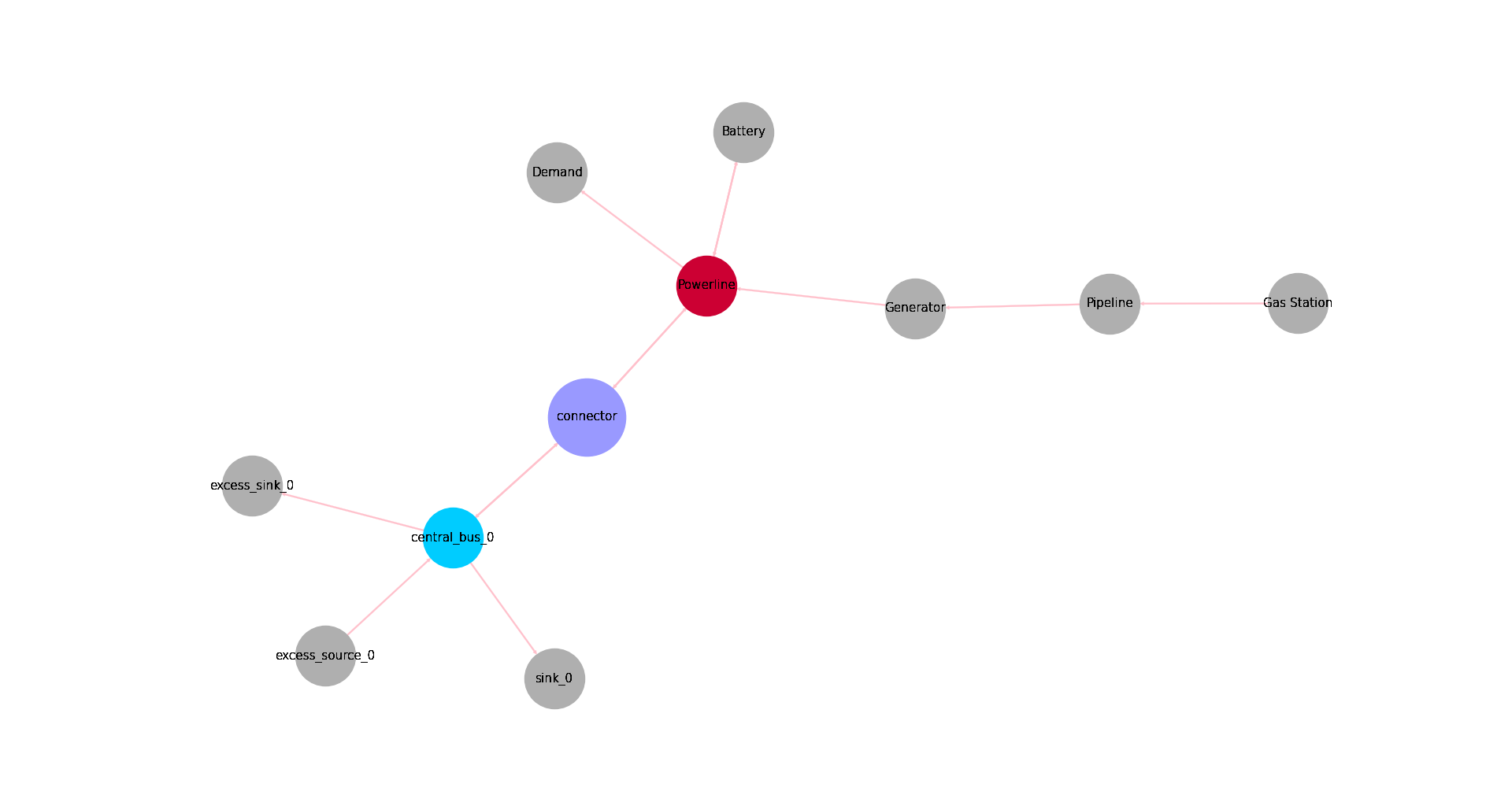
Connect instances of hard coded tessif energy systems:
Setting spellings.get_from’s logging level to debug for decluttering doctest output:
>>> from tessif.frused import configurations
>>> configurations.spellings_logging_level = 'debug'
Create the energy systems:
>>> import tessif.examples.data.tsf.py_hard as coded_examples
>>> mwe = coded_examples.create_mwe()
>>> mssesu = coded_examples._create_minimal_es_unit(0, seed=42)
Connect the energy systems:
>>> from tessif.frused.namedtuples import Uid
>>> ces = mwe.connect(
...     energy_system=mssesu,
...     connecting_busses=('Powerline', 'Central Bus 0'),
...     connection_uid=Uid(name='connector'))
Transform the connected energy system to e.g omeof to see if the connection holds:
>>> from tessif.transform.es2es.omf import transform
>>> oemof_es = transform(ces)
>>> for node in oemof_es.nodes:
...     if str(node.label) == 'connector':
...         print(node)
connector
Perform a simulation to check if es is optimizable:
>>> import tessif.simulate as simulate
>>> optimized_oemof_es = simulate.omf_from_es(oemof_es)
Show some results:
>>> import tessif.transform.es2mapping.omf as oemof_results
>>> resultier = oemof_results.LoadResultier(optimized_oemof_es)
>>> print(resultier.node_load['Powerline'])
Powerline            Battery  Generator  connector  Battery  Demand  connector
1990-07-13 00:00:00    -10.0      -73.0       -0.0      0.0    10.0       73.0
1990-07-13 01:00:00     -0.0      -84.0       -0.0      0.0    10.0       74.0
1990-07-13 02:00:00     -0.0      -84.0       -0.0      0.0    10.0       74.0
1990-07-13 03:00:00     -0.0      -84.0       -0.0      0.0    10.0       74.0
>>> print(resultier.node_load['Central Bus 0'])
Central Bus 0        Excess Source 0  Power Generator 0  Renewable Source 0  Storage 0  connector  Excess Sink 0  Sink 0  Storage 0  connector
1990-07-13 00:00:00             -0.0               -0.0                -8.0       -1.0      -73.0            0.0    82.0        0.0        0.0
1990-07-13 01:00:00             -0.0               -0.0                -8.0       -0.0      -74.0            0.0    82.0        0.0        0.0
1990-07-13 02:00:00             -0.0               -0.0                -8.0       -0.0      -74.0            0.0    82.0        0.0        0.0
1990-07-13 03:00:00             -0.0               -0.0                -8.0       -0.0      -74.0            0.0    82.0        0.0        0.0
Plot the energy system for better understanding the defaults:
>>> import matplotlib.pyplot as plt
>>> import tessif.visualize.nxgrph as nxv
>>> grph = ces.to_nxgrph()
>>> drawing_data = nxv.draw_graph(
...     grph,
...     node_color={'connector': '#9999ff',
...                 'Powerline': '#cc0033',
...                 'central_bus_0': '#00ccff'},
...     node_size={'connector': 5000},
...     edge_color='pink',
...     layout='neato')
>>> # plt.show()  # commented out for better doctesting
- dump(directory=None, filename=None)[source]
Store (dump) the energy system into
directory.filename.- Parameters:
directory¶ (str, default=None) –
Path the created energy system is dumped to. Passed to
pickle.dump().Will be
joinedwithfilename. To create an absolute path.If set to
None(default)tessif.frused.paths.write_dir/tsf will be the chosen directory.filename¶ (str, default=None) –
dump()the energy system using this name.If set to
None(default) filename will beenergy_system.tsf.
Example
Using the
hardcoded fully parameterized example>>> import tessif.examples.data.tsf.py_hard as tsf_examples >>> es = tsf_examples.create_fpwe() >>> msg = es.dump()
Default storage location (relative to tessif’s
root directory):>>> print("Stored Tessif Energy System to", os.path.join( ... 'tessif', *msg.split('tessif')[-1].split(os.path.sep))) Stored Tessif Energy System to tessif/write/tsf/energy_system.tsf
- duplicate(prefix='', separator='_', suffix='copy')[source]
Duplicate the energy system and return it. Potentially modify the node names.
- Parameters:
prefix¶ (str, default='') – String added to the beginning of every node’s
Uid.name, separated byseperator.separator¶ (str, default='_') – String used for adding the
prefixand thesuffixto every node’sUid.name.suffix¶ (str, default='') – String added to the beginning of every node’s
Uid.name, separated byseperator.
- to_hdf5(directory=None, filename=None)[source]
Store (dump) the energy system info as a hdf5 file.
- Parameters:
directory¶ (str, default=None) –
String representing of a path the created energy system is dumped to. Passed to
recursively_save_dict_contents().Will be
joinedwithfilenameto create an absolute path.If set to
None(default)tessif.frused.paths.write_dir/tsf will be the chosen directory.filename¶ (str, default=None) –
Save the energy system to a hdf5 file with this name.
If set to
None(default) filename will beenergy_system.hdf5.
Example
Using the
hardcoded fully parameterized example>>> import tessif.examples.data.tsf.py_hard as tsf_examples >>> es = tsf_examples.create_fpwe() >>> msg = es.to_hdf5()
Default storage location (relative to tessif’s
root directory):>>> print("Stored Tessif Energy System to", os.path.join( ... 'tessif', *msg.split('tessif')[-1].split(os.path.sep))) Stored Tessif Energy System to tessif/write/tsf/energy_system.hdf5
- to_cfg(directory=None)[source]
Store (dump) the energy system info as a hdf5 file.
- Parameters:
directory¶ (str, Path default=None) –
Path/String representation of a path the created cfg files are stored in.
If set to
None(default)tessif.frused.paths.write_dir/tsf/cfg will be the chosen directory.Directory created if not present.
Example
Using the
hardcoded fully parameterized example>>> import tessif.examples.data.tsf.py_hard as tsf_examples >>> es = tsf_examples.create_fpwe() >>> msg = es.to_cfg()
Write a little test functionality for checking if to and from conifg file parsing are succesfull:
>>> from tessif.model.energy_system import AbstractEnergySystem as AES
>>> from tessif import parse
>>> import tempfile
Declutter logging output:
>>> import tessif.frused.configurations as configurations
>>> configurations.spellings_logging_level = "debug"
Define the mentioned helper function:
>>> def test_to_cfg(es, folder):
...     es.to_cfg(folder)
...     parsed_es = AES.from_external(
...         path=folder,
...         parser=parse.flat_config_folder
...     )
...
...     for es_attr in es._es_attributes:
...         if es_attr == "timeframe":
...             assert getattr(es, es_attr).equals(
...                 getattr(parsed_es, es_attr))
...         elif es_attr == "global_constraints":
...             if not getattr(es, es_attr) == getattr(
...                     parsed_es, es_attr):
...                 print("original:", getattr(es, es_attr))
...                 print("parsed:", getattr(parsed_es, es_attr))
...         else:
...             for es_node, pes_node in zip(
...                     getattr(es, es_attr), getattr(es, es_attr)):
...                 for es_attr, pes_attr in zip(
...                     es_node.attributes.values(),
...                     pes_node.attributes.values()
...                 ):
...                     if not es_attr == pes_attr:
...                         print("original:", es_attr)
...                         print("parsed:", pes_attr)
Utilize above function to check hardcoded examples parsing:
>>> import tessif.examples.data.tsf.py_hard as example_module
>>> import_aliases = [
...     "create_mwe",
...     "create_fpwe",
...     "emission_objective",
...     "create_connected_es",
...     "create_chp",
...     "create_variable_chp",
...     "create_storage_example",
...     "create_expansion_plan_example",
...     "create_simple_transformer_grid_es",
... ]
>>> for alias in import_aliases:
...     energy_system = getattr(example_module, alias)()
...     print(energy_system.uid, "..")
...     with tempfile.TemporaryDirectory() as tempdir:
...         test_to_cfg(energy_system, folder=tempdir)
...     print(".. parsed succesfully!")
Minimum_Working_Example ..
.. parsed succesfully!
Fully_Parameterized_Working_Example ..
.. parsed succesfully!
Emission_Objective_Example ..
.. parsed succesfully!
Connected-Energy-Systems-Example ..
.. parsed succesfully!
CHP_Example ..
.. parsed succesfully!
CHP_Example ..
.. parsed succesfully!
Storage-Energysystem-Example ..
.. parsed succesfully!
Expansion Plan Example ..
.. parsed succesfully!
Two Transformer Grid Example ..
.. parsed succesfully!
- restore(directory=None, filename=None)[source]
Restore a dumped energy system
directory.filename.- Parameters:
directory¶ (str, default=None) –
Path the created energy system was dumped to. Passed to
pickle.restore().Will be
joinedwithfilename. To create an absolute path.If set to
None(default)tessif.frused.paths.write_dir/tsf will be the chosen directory.filename¶ (str, default=None) –
load()the energy system using this name.If set to
None(default) filename will beenergy_system.tsf.
Example
Using the
hardcoded fully parameterized example…>>> import tessif.examples.data.tsf.py_hard as tsf_examples >>> es = tsf_examples.create_fpwe()
… to dump it into Tessif’s default storage location (relative to tessif’s
root directory) …>>> msg = es.dump()
… and restore it:
>>> msg = es.restore()
>>> print("Restored Tessif Energy System from", os.path.join(
...    'tessif', *msg.split('tessif')[-1].split(os.path.sep)))
Restored Tessif Energy System from tessif/write/tsf/energy_system.tsf
Use Case:
>>> from tessif.model.energy_system import AbstractEnergySystem
>>> restored_es = AbstractEnergySystem('This Instance Is Restored')
>>> msg = restored_es.restore()
>>> for node in restored_es.nodes:
...     print(node.uid.name)
Pipeline
Powerline
Gas Station
Solar Panel
Demand
Generator
Battery
- classmethod from_pickle(directory=None, filename=None)[source]
Create an energy system instance from a pickle dumped binary.
- Parameters:
directory¶ (str, default=None) –
String representing of a path the created energy system was dumped to. Passed to
pickle.restore().Will be
joinedwithfilename. To create an absolute path.If set to
None(default)tessif.frused.paths.write_dir/tsf will be the chosen directory.filename¶ (str, default=None) –
load()the energy system using this name.If set to
None(default) filename will beenergy_system.tsf
Example
Restoring a tessif energy system model from tessif’s default location:
>>> from tessif.model.energy_system import AbstractEnergySystem
>>> es = AbstractEnergySystem.from_pickle()
>>> for node in es.nodes:
...     print(node.uid.name)
Pipeline
Powerline
Gas Station
Solar Panel
Demand
Generator
Battery
Note
See
dump'sExample on how the pickled energy system got there in the first place.
- classmethod from_external(path, parser, **kwargs)[source]
Create an energy system using a nested mapping from an external data source.
Note
For more on nested
mappingsrefer to tessif’s concept section. A list of supported datatypes can be found here.- Parameters:
Path or string representation of a path specifying the location of the file from which the energy system is to be created.
For a list of supported datatypes see Supported Data Formats.
Functional used to read in and parse the energy system data. Usually one of the module functions found in
tessif.parseUse
functools.partial()for supplying parameters. See also the Example section.
Example
Creating an energy system out of a folder of flat config files:
>>> from tessif.parse import flat_config_folder
>>> from tessif.model.energy_system import AbstractEnergySystem
>>> from tessif.frused.paths import example_dir
>>> import os
>>> es = AbstractEnergySystem.from_external(
...     path=os.path.join(example_dir, 'data', 'tsf',
...                       'cfg', 'flat', 'basic'),
...     parser=flat_config_folder)
>>> print(es.uid)
es_from_external_source
>>> for node in es.nodes:
...     print(node.uid.name)
Pipeline
Power Line
Air Chanel
Gas Station
Solar Panel
Air
Demand
Generator
Battery
- classmethod from_components(uid, components, timeframe, global_constraints={'emissions': inf}, **kwargs)[source]
Create an energy system from a collection of component instances.
Particularly usefull when creating energy systems out of existing ones.
- Parameters:
uid¶ (Hashable) – Hashable unique identifier. Usually a string aka a name.
components¶ (~collections.abc.Iterable) – Iterable of
tessif.model.components.AbstractEsComponentobjects the energy system will be created of.timeframe¶ (pandas.DatetimeIndex, optional) –
Datetime index representing the evaluated timeframe. Explicitly stating:
initial datatime (0th element of the
pandas.DatetimeIndex)number of timesteps (length of
pandas.DatetimeIndex)temporal resolution (
pandas.DatetimeIndex.freq)
For example:
idx = pd.DatetimeIndex(
    data=pd.date_range(
        '2016-01-01 00:00:00', periods=11, freq='H'))
global_constraints¶ (dict, default={'emissions': float('+inf')}) –
Dictionairy of
numericvalues mapped to global constraint namingstrings.Recognized constraint keys are:
emissions…
For a more detailed explanation see the user guide’s section: Secondary Objectives
- Returns:
The newly constructed energy system containing each component found in
components.- Return type:
Example
Use a hard coded example:
>>> import tessif.examples.data.tsf.py_hard as coded_examples
>>> mwe = coded_examples.create_mwe()
>>> print(mwe.uid)
Minimum_Working_Example
>>> for node in mwe.nodes:
...     print(node.uid)
Pipeline
Powerline
Gas Station
Demand
Generator
Battery
Reconstruct the es by using the mwe:
>>> from tessif.model.energy_system import AbstractEnergySystem
>>> es = AbstractEnergySystem.from_components(
...          uid='from_components_examples',
...          components=mwe.nodes,
...          timeframe=mwe.timeframe,
...          global_constraints=mwe.global_constraints)
>>> print(es.uid)
from_components_examples
>>> for node in es.nodes:
...     print(node.uid)
Pipeline
Powerline
Gas Station
Demand
Generator
Battery
- to_nxgrph()[source]
Transform the
AbstractEnergySystemobject into anetworkx.DiGraphobject.- Returns:
directional_graph – Networkx Directional Graph representing the abstract energy system.
- Return type: