Quick Start
Following sections provide a - little talk, much code - introduction to tessif. Everything should be copy-pastable and work out of the box, given your installation of tessif was successful.
Transform es to oemof and pypsa and simulate it
In this example a minimal energy system is created in tessif, then transformed into both an oemof and a pypsa energy system and then each gets simulated.
Create the tessif energy system. Use the
create_mwe()function from tessif’s example hub to get one of the hardcoded example energy systems:import tessif.examples.data.tsf.py_hard as tsf_examples tsf_es = tsf_examples.create_mwe()
Hint
Access the nodes of the energy system by iterating over them:
for node in tsf_es.nodes:
    print(node.uid)
Transform the tessif energy system into oemof and pypsa energy systems:
import tessif.transform.es2es.omf as tsf2omf
import tessif.transform.es2es.ppsa as tsf2pypsa
oemof_es = tsf2omf.transform(tsf_es)
pypsa_es = tsf2pypsa.transform(tsf_es)
Optimize the energy systems using
tessif.simulatewhich is a wrapper for the simulation calls of the supported models (more info here):import tessif.simulate optimized_oemof_es = tessif.simulate.omf_from_es(oemof_es) optimized_pypsa_es = tessif.simulate.ppsa_from_es(pypsa_es)
Show some results with the help of tessif’s post processing utilities. In this example the loads of a specific node are shown.
import tessif.transform.es2mapping.omf as post_process_oemof
import tessif.transform.es2mapping.ppsa as post_process_pypsa
oemof_load_results = post_process_oemof.LoadResultier(optimized_oemof_es)
pypsa_load_results = post_process_pypsa.LoadResultier(optimized_pypsa_es)
print(oemof_load_results.node_load['Powerline'])
print(pypsa_load_results.node_load['Powerline'])
Automatically compare es optimized with different models
In this example a minimal energy system is created in tessif, then
Comparatier is used to transform it into
different models and perform automated comparisons between them, then
ComparativeResultier is used to show some of the
results.
Change spellings_logging_level to ‘debug’ to declutter the output:
import tessif.frused.configurations as configurations
configurations.spellings_logging_level = 'debug'
Create the tessif energy system and write it to disk. Use the
create_mwe()function from tessif’s example hub to get one of the hardcoded example energy systems:import os import tessif.examples.data.tsf.py_hard as tsf_examples from tessif.frused.paths import write_dir tsf_es = tsf_examples.create_fpwe() output_msg = tsf_es.to_hdf5( directory=os.path.join(write_dir, 'tsf'), filename='fpwe_quick.hdf5', )
Let the
Comparatierdo the auto comparison:import tessif.analyze import tessif.parse comparatier = tessif.analyze.Comparatier( path=os.path.join(write_dir, 'tsf', 'fpwe_quick.hdf5'), parser=tessif.parse.hdf5, models=('oemof', 'pypsa'), )
Access the results. What follows are some examples for the kinds of results that are available. More can be found here.
Print the flow emissions of a specific edge:
print(comparatier.comparative_results.emissions[('Generator', 'Powerline')])
returns:
omf     10.000000
ppsa    17.142857
Name: (Generator, Powerline), dtype: float64
Print the computation time used by each model:
import pprint
for model, timing_results in comparatier.timing_results.items():
    print(model)
    print(79*'-')
    pprint.pprint(timing_results)
    print(79*'-')
returns:
omf
-------------------------------------------------------------------------------
{'parsing': 2,
 'post_processing': 5,
 'reading': 1,
 'simulation': 4,
 'transformation': 3}
-------------------------------------------------------------------------------
ppsa
-------------------------------------------------------------------------------
{'parsing': 2,
 'post_processing': 5,
 'reading': 1,
 'simulation': 4,
 'transformation': 3}
-------------------------------------------------------------------------------
Visualize an energy system
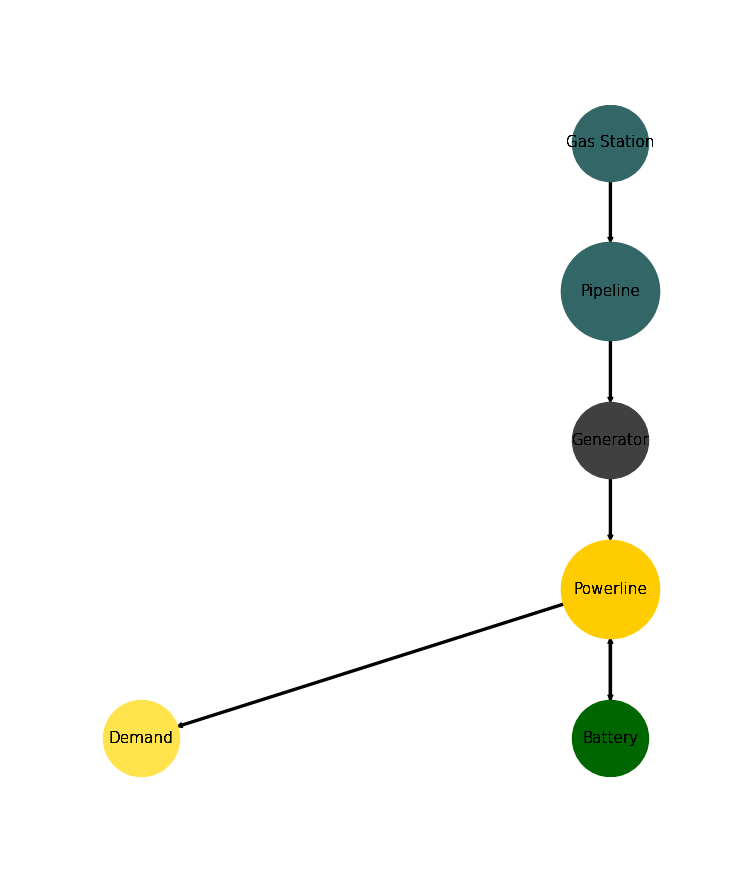
In this example a minimal energy system is created in tessif, then
transformed into a networkx.DiGraph object and then visualized using
the nxgrph module's function
draw_graph(). More info on visualizing energy
systems can be found here.
Create the tessif energy system. Use the
create_mwe()function from tessif’s example hub to get one of the hardcoded example energy systems:import tessif.examples.data.tsf.py_hard as tsf_examples es = tsf_examples.create_mwe()
Use the
energy system'smethodto_nxgrph()to create anetworkx.DiGraphobject:graph = es.to_nxgrph()
Use the
draw_graph()function to create the visual output:import matplotlib.pyplot as plt import tessif.visualize.nxgrph as nxv drawing_data = nxv.draw_graph( graph, node_color={ 'Generator': '#404040', 'Battery': '#006600', 'Gas Station': '#336666', 'Pipeline': '#336666', 'Demand': '#ffe34d', 'Powerline': '#ffcc00', }, node_size={ 'Powerline': 5000, 'Pipeline': 5000 }, ) plt.show()
returns:
Use oemof through tessif
Note
This example is taken from omf which uses tessif’s example hub utilizing an Excel-Spreadsheet as source and tessif’s corresponding parser
from tessif.simulate import omf as simulate_oemof
from tessif.simulate import omf as simulate_oemof
from tessif.parse import xl_like
from tessif.frused.paths import example_dir
import os
es = simulate_omf(
    path=os.path.join(example_dir, 'data', 'omf', 'xlsx', 'energy_system.xlsx'),
    parser=xl_like)